Showing posts with label 3D. Show all posts

Wednesday, April 8, 2015

What's new in CityEngine 2015

New version of CityEngine is out. Elliot Hartley already mentioned it in his blog post but there are some other changes. One prominent change is Scene tab. Here is the default appearance (for Redlands Redevelopment project.


From this it may not be clear what is the left square used for. It is used to assign a colour to that layer. Simple click on the box brings up a colour selector and result is like below.


Another new feature of Scene tab is ability to create layer groups . In Scene tab right mouse click and from context menu select New, Group Layer


New group is empty and one can just simply drag & drop layers into the group, just like in ArcMap. Of course, new group layer can have a colour assigned. If it is assigned it overrides colours of layers within it.


From CGA standpoint getTreeKey is important. From help documentaion:

The unique TreeKey of the shape being derived, formatted as a string list. The TreeKey is a list of integer numbers denoting the path from the root shape to the shape being derived in the shape tree. Each number denotes the 0-based child index

Sample code for using getTreeKey

CGA Code
Init-->
    print(getTreeKey() + " - Init") 
 center(xz)
 extrude(10)
 comp(f) { front: Facade}
 
Facade-->
 print(getTreeKey() + " - Facade")
 split(y) {'0.5 : Floor }*
 
Floor-->
 print(getTreeKey() + " - Floor")
 split(x) { '0.1 : Wall | '0.3 : Window | '0.1 : Wall }*
  
Wall-->
 print(getTreeKey() + " - Wall")

Window-->
 print(getTreeKey() + " - Window")


and it's output

0; - Init
0;0; - Facade
0;0;0; - Floor
0;0;1; - Floor
0;0;0;0; - Wall
0;0;0;1; - Window
0;0;0;2; - Wall
0;0;0;3; - Wall
0;0;0;4; - Window
0;0;0;5; - Wall
0;0;1;0; - Wall
0;0;1;1; - Window
0;0;1;2; - Wall
0;0;1;3; - Wall
0;0;1;4; - Window
0;0;1;5; - Wall

More on new features when I spend little bit more time with this version.

Monday, November 12, 2012

New Zealand textures for CityEngine

Working with 3D models is great fun but when it comes to finding good textures it may not be so fun anymore. I am working with CityEngine since mid last year and I am always on lookout for good textures. If they are free then it's even better. Searching on the web for texture packs and/or generic textures for buildings (mainly roofs and facades) wasn't very successful.

Luckily, in October I got in touch with Monier, one of the biggest brick and tile manufacturers in New Zealand. They were planning on releasing a texture pack suitable for use in 3D Max, AutoCAD, Revit, SketchUp, CityEngine and other applications that use plain image textures. Unfortunately, the texture pack was not ready in time for Esri Asia Pacific User Conference (APUC). I wanted to use the Material Library for rendering of buildings in CityEngine at APUC. On the very last day of the Conference I got an e-mail announcing the release of Material Library.

Material Library is now available as free download. From Material Library page choose your preferred format or if you prefer plain images go to the Individual Bricks page for wall cladding (bricks). If you are after roof tiles range select Tile Range or Individual Tiles.

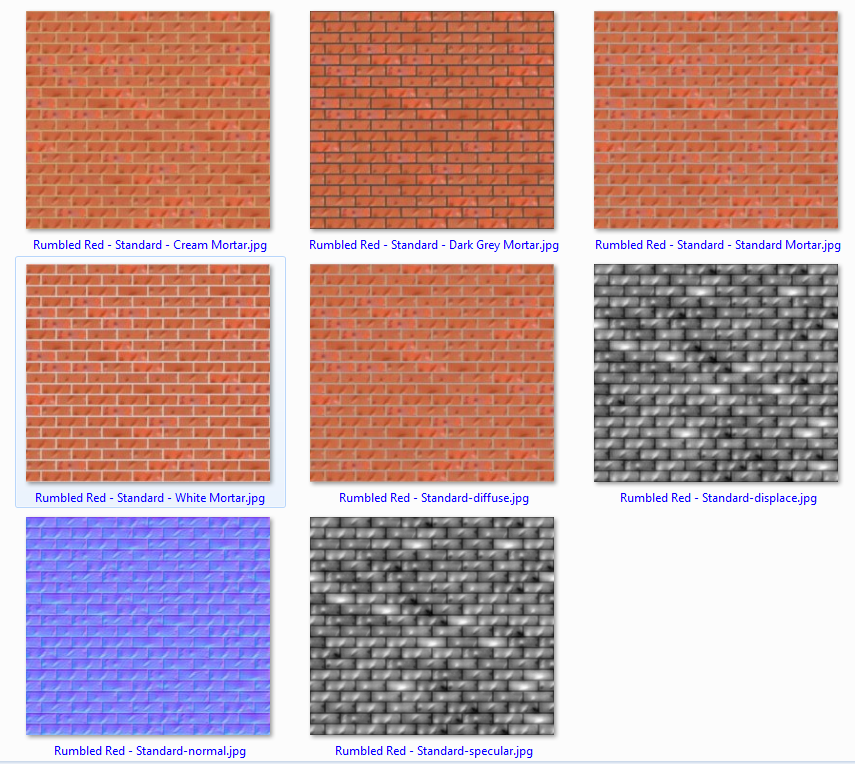
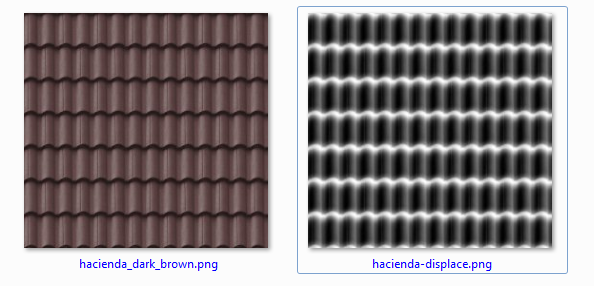
Being a large brick and tile maker Monier has a large range of products and that gives us, 3D users, a very nice collection of textures. Also they have included bump/normal/displacement maps for both bricks and tiles. Here are  few examples.


Closer look at the bricks example screenshot shows different colours of mortar available, normal map and specular map too. A nice bonus!

For use in CityEngine I have copied all brick textures in a single folder and then just using fileRandom like below to select textures and then texture set of buildings in New Zealand set of textures.

attr wall_tex = fileRandom("assets/CEmonierbricks/*Mortar.jpg")
attr wall_normal = substring(wall_tex,0,find(wall_tex,"-",1))+"-normal.jpg" 
attr wall_spec = substring(wall_tex,0,find(wall_tex,"-",1))+"-specular.jpg"


Here is a quick example of few buildings using these textures in CityEngine 2012.


These images are from early version of the rule since I am not certain of correct sizing of textures. That information (proper size of texture in metres, e.g. single tile covers 2.2m x 2.2m)  is missing from texture pack currently. Hopefully, this will be included in next/updated release of Material Library.

Great job Monier!

Now that we have a good example from Monier it would be great if other manufactures (other types of cladding, doors, etc) would follow the suite. Anyone?


Monday, October 1, 2012

CityEngine 2012 - First look

CityEngine 2012 is imminent and there are several new features worthy of your attention. Some of them will be of interest to GIS professionals only but there is plenty of new functionality for everybody.

Here are key new features:

  • 3D Editing of generated models
  • Full support for file geodatabase
  • Web Scenes sharing via ArcGIS Online
  • New CGA functionality
  • New examples
  • Licensing mechanism update
Here are some details about above points.

3D Editing of generated models
Until now it was not possible to edit models generated by rules. Now there is a set of basic 3D editing tools and functions that allows SketchUp like editing. Edited multipatches can be saved back to the file geodatabase. To get most out of it check out the Tutorial 14 Basic Polygonal Modeling.


Full support for file geodatabase
The big improvement is import and export of textured multipatches. Not only that textures are supported but one can choose to append to existing feature class, update it or create a new one. This will make it much easier to create several design options for planners and designers.


Web Scenes sharing via ArcGIS Online
Scenes created in CE can now be shared with much greater audience. The scene is uploaded to ArcGIS Online and there you specify how it will be shared. Some examples are already live on ArcGIS.com 3D Web Scenes page. This is an excellent opportunity for planners, urban designers, landscape architects to present solution to wide (or limited) audience. Just to remind you that your browser must support WebGL. Latest versions of Chrome and FireFox work just fine. Below is an example of tiny web scene exported from CityEngine before it is published to ArcGIS Online.


New CGA functionality
New envelope operation is set to be an instant hit with urban designers and planners. It allows you to visualize build volumes. When used in tandem with mass models or as-built representation one can quickly find out problem areas. Envelope operation is also nicely demonstrated in this short video.


For more accurate analysis go to ArcGIS and use Intersect 3D tool.

Before publishing your scene as Web scene you will most likely use reduceGeometry operation to reduce number of vertices. For troublesome geometry use cleanupGeometry operation.

For full list of changes check the CGA Changelog in CityEngine help.

There are also changes in user interface. Icons on toolbars are now in single colour - black. 


###

And now something little bit different. I have a privilege to present a half day workshop on Geodesign at Asia Pacific User Conference in November in Auckland. Several papers about use of CityEngine will be  also presented. Hope to see you there.


Wednesday, July 13, 2011

Esri acquires Procedural

One of most interesting news I have heard from esri in a while came yesterday morning. My friend Ryan is attending Esri International User Conference and he sent me a brief e-mail:

Esri bought procedural and city engine. Just found out.

The reason why I find this exciting is in the potential of what we, GIS specialist, can do with tool like CityEngine. If you don’t know about Procedural and their product you may have seen a documentary titled Megacities from National Geographic. This was done in CityEngine and other tools for media production. To find out more read this article. If you liked Prince of Persia movie, the city was built in CityEngine. For gamers out there, Unreal, CryEngine, Unity engines are integrating with CityEngine too.

What does CityEngine do?

From Procedural’s web site:

CityEngine is a standalone software that provides professional users in entertainment, architecture, urban planning, GIS and general 3D content production with a unique conceptual design and modeling solution for the efficient creation of 3D cities and buildings.

It is standalone tool that can rapidly create large number of objects. Objects can be buildings, wall, roads, street furniture or they can be imported. Object generation and placement is based on rules. Rules can be easily created and modified and scene is easily regenerated.

CityEngineRules

Above screenshot is taken from a tutorial video. Visit Support page for access to lot more videos. For automation scripting language is the Python. Another bonus!
CityEngine and GIS

Benefits and use cases for using CityEngine in or with GIS are numerous. Firstly, it supports shapefile as input data format. Since it is now part of esri family I would expect geodatabase support in near future. Having shapefiles allows you to control or define rules from those attribute values, like number of floors, building type (residential, commercial, etc), building style/era and so on. Example can be found over here with more information and brief video is below.

ArcGIS and CityEngine

Some areas where CityEngine could be used in GIS:

  • City planning
  • Road (re)design
  • Landscape design and evaluation
  • Shadow analysis
  • Viewshed analysis
  • Intelligence and security analysis
  • Telecommunications

Map-controlled modeling feature is the one that almost every GIS user can take advantage of. An image determines type of features that will be generated or where blocking zones will be.

Map controlled modeling

Parametric modeling allows dynamic changes of features. Take streets for an example. This is very nicely illustrated in this video.

Interactive streets remodeling

There is lot more to be explored and tested but that is for another time.

Closing thoughts

Procedural and CityEngine are great addition to the set of tools esri users have at their disposal and I am really looking forward to work with it again. In addition to being great tool, support is also very good. Turn around time on the question I asked was few days (head office is in Switzerland) and answers were simple and precises. They did follow up afterwards and provided me with number of useful links.

Procedural is frequently updating the software and below are some features important to esri users.

  • Export to shapefile
  • Export to Collada
  • Mulitpatch support

Now it is waiting game to see what and how CityEngine will be offered to esri customers.

Thursday, May 5, 2011

Intel developed Tri-Gate, first 3D transistor

After a long time there is something really new in the CPU/chips area. Intel has announced they have developed a 3D transistors in 22nm technology called Tri-Gate. This is exciting news because 3D transistors should provide following benefits:


  • lower voltage requirements
  • increased performance
  • increased density
These new transistors are not just a idea. Intel is implementing them in mass production in world's first 22nm microprocessor, codenamed "Ivy Bridge".

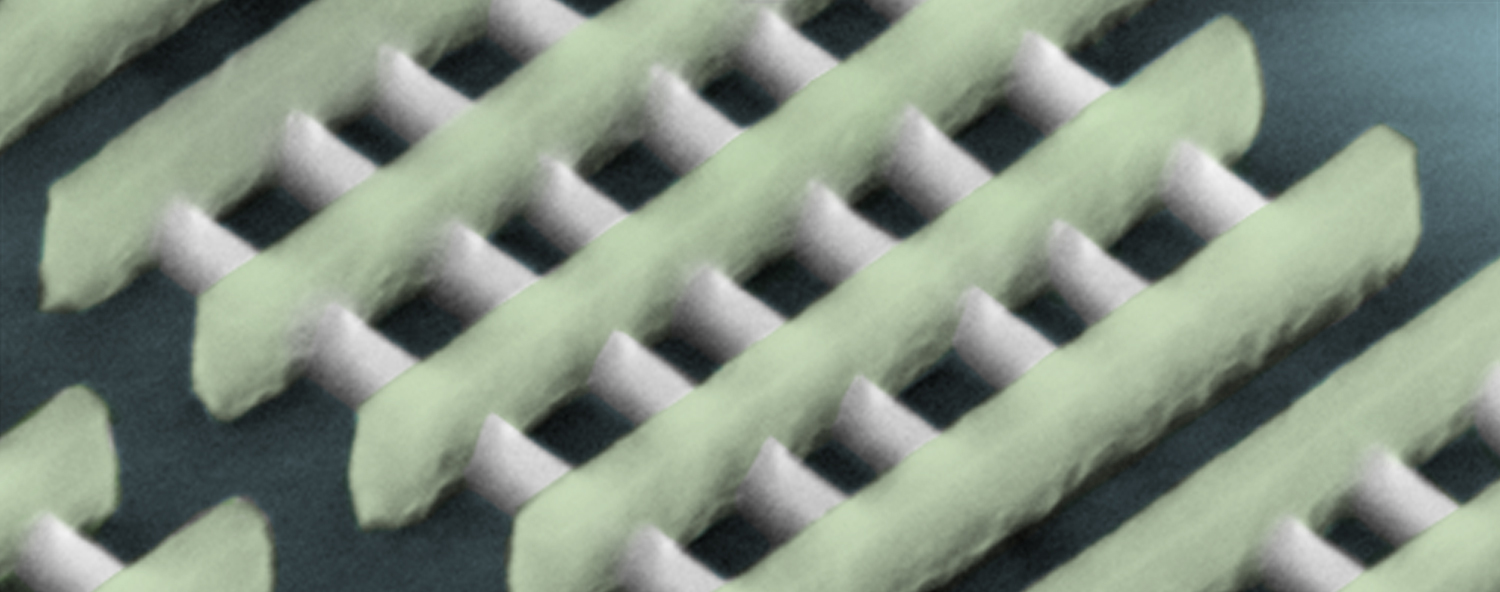
Here is how Tri-Gate looks under electronic microscope.


Find more about production process in this video.


More information can be found here at Intel and more images and documents at Intel's Newsroom.

Soon we should see laptops handhelds and other devices running these chips. Let's hope they will live to our expectations.